AWS Internet Gateway Explained: What Really Happens When You Access Your EC2 Public IP?
One of the biggest misconceptions in AWS networking is that the Internet directly talks to your Internet Gateway. It doesn't.
Let's understand the complete journey of a request from your browser to your FastAPI application running on EC2.
Introduction
Suppose you have deployed a FastAPI application on an EC2 instance.
Your application is running on:
http://54.xx.xx.xx:8000When you open this URL in your browser, have you ever wondered:
- How does the request reach AWS?
- How does AWS know which VPC it belongs to?
- Where does the Internet Gateway come into play?
- Why doesn't the request go to someone else's Internet Gateway?
After researching AWS networking, I realized the answer is much more interesting than simply saying:
"Internet Gateway connects your VPC to the Internet."
Let's dive deeper.
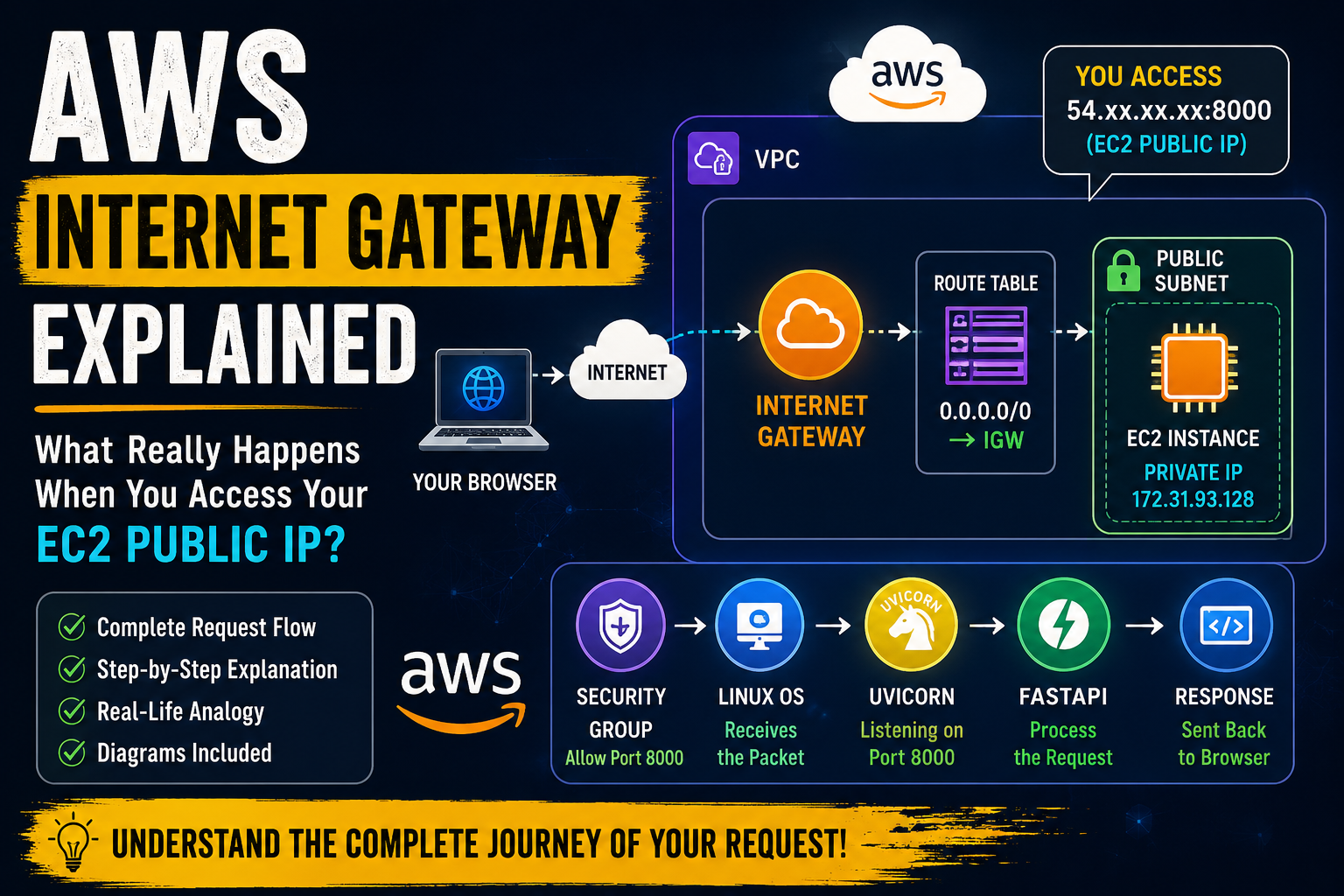
Our AWS Architecture
                 Internet
                     │
                     │
          AWS Global Network
                     │
          Internet Gateway (IGW)
                     │
              Public Route Table
                     │
               Public Subnet
                     │
          EC2 (Public + Private IP)
                     │
FastAPI AppStep 1 — Your Browser Creates the Request
You type:
http://54.xx.xx.xx:8000Your browser creates a packet.
Source IP      : Your Laptop Public IP
Destination IP : 54.xx.xx.xx
Destination Port : 8000
Notice something important.
Your browser knows nothing about:
- AWS
- VPC
- Internet Gateway
- EC2
It only knows:
Send this packet to IP address
54.xx.xx.xx.
Step 2 — The Internet Starts Routing
The packet travels through multiple routers.
Laptop
   │
Home Router
   │
ISP
   │
Internet Routers
   │
???
Every router asks only one question:
Who owns this destination IP?
Routers do not know what an EC2 instance is.
They simply route packets based on IP ownership.
Step 3 — AWS Owns That Public IP
Public IP addresses are allocated to cloud providers.
For example (illustrative):
AWS      → 54.x.x.x
Azure    → 20.x.x.x
Google   → 35.x.x.x
Since the destination IP belongs to AWS:
Destination IP
54.xx.xx.xx
        │
        ▼
AWS Network
The Internet's job is finished.
From here onward, AWS takes control.
Step 4 — AWS's Internal Network Takes Over
This is where many people get confused.
Most people imagine:
Internet
      │
      ▼
Internet Gateway
This is not what happens.
Instead:
Internet
      │
      ▼
AWS Global Network
AWS first receives the packet into its own networking infrastructure.
AWS internally knows something like this:
54.xx.xx.xx
      │
      ▼
Region : ap-south-1
      │
      ▼
VPC : vpc-12345
      │
      ▼
Internet Gateway : igw-abc123
      │
      ▼
EC2 : i-123456
This mapping is maintained entirely by AWS.
You never configure it.
Step 5 — Internet Gateway Comes Into Play
Now AWS has identified:
- Which Region
- Which VPC
- Which EC2
AWS forwards the traffic through the Internet Gateway attached to that VPC.
AWS Global Network
        │
        ▼
Internet Gateway
        │
        ▼
VPC
Notice something.
The Internet Gateway is inside AWS.
It is not sitting somewhere on the public Internet.
It is a logical networking component managed by AWS.
Step 6 — Route Table Decides Where to Send the Packet
Your VPC may contain multiple subnets.
The route table determines where the packet should go.
Example:
Destination      Target

172.31.0.0/16    Local
0.0.0.0/0        Internet Gateway
The packet is forwarded into the correct subnet.
Step 7 — Security Group Checks the Traffic
Before reaching your EC2:
AWS checks the Security Group.
Example:
Inbound

TCP
Port 8000

Source

0.0.0.0/0
If allowed:
Packet AcceptedOtherwise:
Packet DroppedStep 8 — EC2 Receives the Packet
Your EC2 actually communicates using its private IP.
Example:
Public IP

54.xx.xx.xx

↓

Private IP

172.31.93.128
AWS performs the mapping internally.
Linux receives the packet.
Step 9 — Uvicorn Receives the Request
Suppose Uvicorn is running:
uvicorn main:app --host 0.0.0.0 --port 8000Linux checks:
Who is listening on port 8000?It finds:
UvicornThen:
Uvicorn
      │
      ▼
FastAPI
      │
      ▼
@app.get("/")
Your API generates a response.
Step 10 — Response Travels Back
The response follows the reverse path.
FastAPI
    │
Uvicorn
    │
Linux
    │
Internet Gateway
    │
AWS Network
    │
Internet
    │
BrowserWhere Exactly Does the Internet Gateway Fit?
Many beginners think:
Internet
     │
Internet Gateway
Actually:
Internet
      │
AWS Global Network
      │
Internet Gateway
      │
VPC
      │
EC2
The Internet Gateway acts as the bridge between AWS's networking infrastructure and your VPC.
It does not receive traffic directly from the Internet before AWS processes it.
Why Doesn't the Request Go to Another Customer's Internet Gateway?
Imagine AWS has millions of customers.
Customer A
    │
IGW-A

Customer B
    │
IGW-B

Customer C
    │
IGW-C
When AWS receives:
Destination IP

54.xx.xx.xx
AWS already knows:
This Public IP

↓

belongs to

↓

EC2

↓

VPC

↓

IGW-B
The request can only enter the Internet Gateway associated with the VPC that owns that public IP.
Real-Life Analogy
Think of AWS like a huge airport.
Airport = AWS Global Network

Terminal = VPC

Entrance = Internet Gateway

Gate = EC2

Passenger = Network Packet
Passengers first arrive at the airport.
Airport systems determine:
- Which airline
- Which terminal
- Which gate
Similarly:
The Internet first sends the packet to AWS.
AWS determines:
- Which Region
- Which VPC
- Which Internet Gateway
- Which EC2
Only then is the packet delivered.
Complete Request Flow
Browser
    │
    ▼
Internet
    │
    ▼
AWS Global Network
    │
    ▼
Public IP Lookup
    │
    ▼
Internet Gateway
    │
    ▼
Route Table
    │
    ▼
Public Subnet
    │
    ▼
Security Group
    │
    ▼
EC2 Private IP
    │
    ▼
Linux
    │
    ▼
Uvicorn
    │
    ▼
FastAPIKey Takeaways
- An Internet Gateway (IGW) is a logical AWS-managed gateway attached to a VPC.
- The public Internet does not know about your Internet Gateway.
- Internet routers send packets only to the public IP's owner (AWS).
- AWS's internal network looks up the destination public IP and determines the correct Region, VPC, and Internet Gateway.
- The Internet Gateway provides the bridge between AWS's network and your VPC.
- Route Tables, Security Groups, and the EC2's public IP work together with the Internet Gateway to allow traffic to reach your application.
Jobi S S
admin
Sharing technical insights, engineering concepts, and practical modern software development guides.
Community Discussion
Enjoyed this read? Show your support or share your thoughts.