Scaling to 1 Million Users: Database Sharding with Django
Table of Contents
- The Problem: One Database Isn't Enough
- What is Database Sharding?
- Choosing a Shard Key
- The Shard Function: UUID Modulo
- Django Multi-Database Configuration
- The User Model
- Writing to the Correct Shard
- Reading: The Fan-Out Query Problem
- Performance: Serial → Parallel Queries
- SQLite Concurrency: The WAL Mode Fix
- Full Name Search with Concat Annotation
- Pagination Across Shards
- Bulk Inserting 1M Users Efficiently
- The REST API Layer
- Django Gotchas You'll Hit
- Tradeoffs and Real-World Considerations
- When Should You Shard?
1. The Problem
My user table had grown to over a million records. The response times on the listing endpoint crept from 50ms to 1–3 seconds. Even with indexes, a single SQLite/PostgreSQL instance was hitting its limits — not because of query complexity, but because of sheer table size.
I'd already tried the obvious:
- ✅ Added indexes on
created_at,username,email - ✅ Used
.only()to avoid fetching unused columns - ✅ Paginated results to 10 per page
The bottleneck was the count query across 1M rows and ORDER BY on 333K rows per shard. Time to go horizontal.
2. What is Database Sharding?
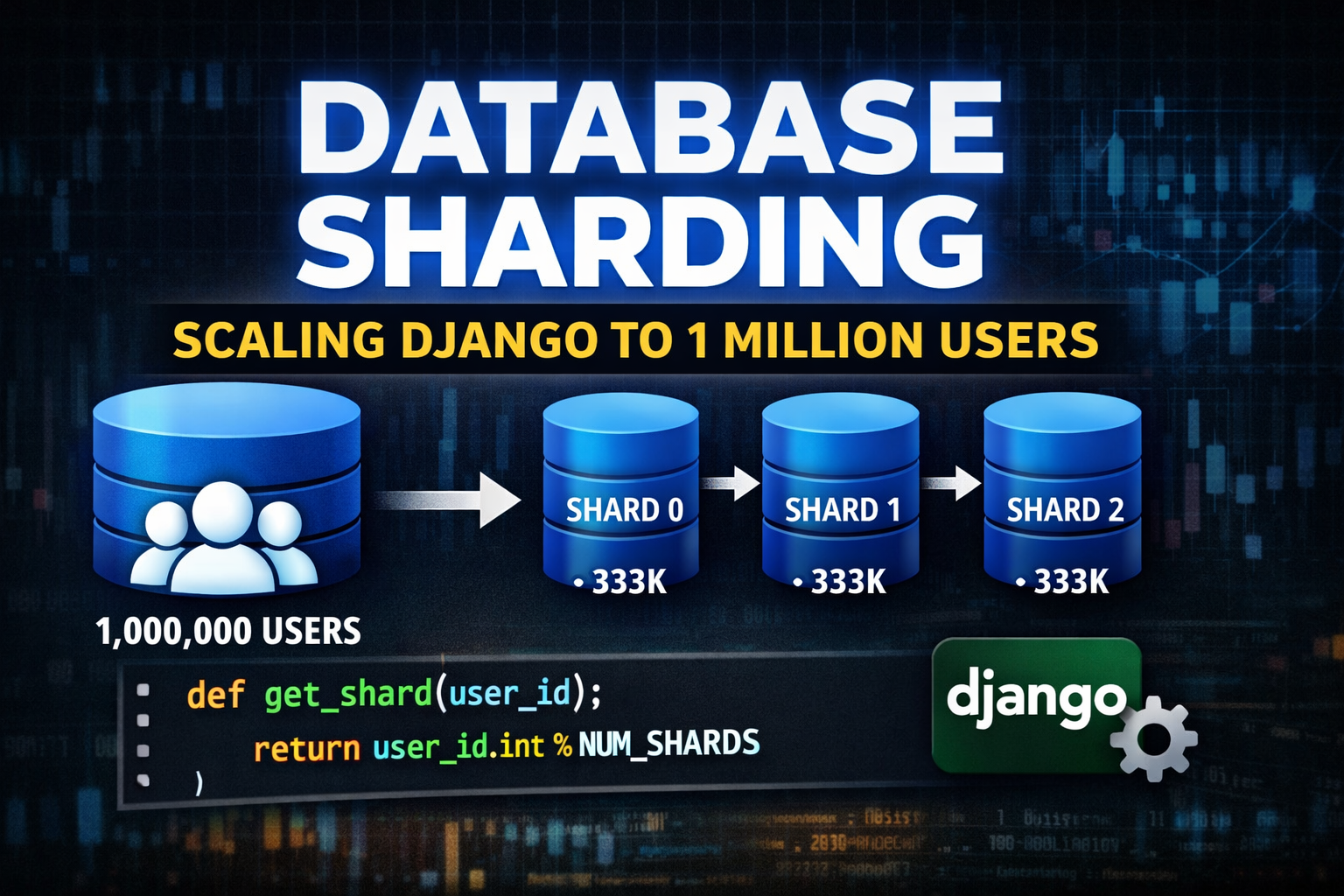
Sharding is horizontal partitioning — instead of one large database, you split the data across multiple databases. Each database holds a shard of the full dataset.
Without Sharding:              With Sharding (3 nodes):

┌──────────────────┐           ┌──────────┐  ┌──────────┐  ┌──────────┐
│   users          │           │ shard_0  │  │ shard_1  │  │ shard_2  │
│──────────────────│   ──▶     │──────────│  │──────────│  │──────────│
│ 1,000,000 rows   │           │ ~333K    │  │ ~333K    │  │ ~333K    │
│ on 1 server      │           │ rows     │  │ rows     │  │ rows     │
└──────────────────┘           └──────────┘  └──────────┘  └──────────┘
Every read and write must be routed to the correct shard. The routing logic is determined by a shard function applied to a shard key.
3. Choosing a Shard Key
The shard key must be:
| Requirement | Why |
|---|---|
| Unique per record | Ensures deterministic routing |
| Immutable | Once a record is written, you can't move it |
| High cardinality | Distributes data evenly — avoids hot shards |
| Available at write time | You must know the shard before inserting |
For users, the UUID primary key is ideal. UUIDs are 128-bit pseudo-random values — they distribute uniformly across any modulo operation by design.
❌ Bad shard keys for users:
email— changes over timecreated_at— causes date-based hot shardscountry— uneven distribution (more US users than Liechtenstein)
4. The Shard Function
The entire routing logic is a single, pure function:
# apis/utils.py
import uuid

NUM_SHARDS = 3

def get_shard(user_id) -> int:
    """
    Maps any UUID to a shard index (0 to NUM_SHARDS-1).
    UUID.int gives the 128-bit integer representation.
    Modulo distributes uniformly since UUIDs are random.
    """
    if isinstance(user_id, str):
        user_id = uuid.UUID(user_id)

    return user_id.int % NUM_SHARDS
Example routing:
UUID: a3f2b1c4-dead-beef-...  →  int: 21784912...  →  21784912 % 3 = 1  →  shard_1
UUID: 00c4e7d1-cafe-babe-...  →  int: 82456134...  →  82456134 % 3 = 0  →  shard_0
UUID: f1a2b3c4-1234-5678-...  →  int: 32104789...  →  32104789 % 3 = 2  →  shard_2
With 1M UUIDs, the distribution is statistically ~333K per shard. In my actual test run, I ended up with 333,333 / 333,333 / 333,334 — essentially perfect.
5. Django Multi-Database Configuration
Django's DATABASES setting natively supports multiple databases. Each shard gets its own entry:
# settings.py
DATABASES = {
    # Default DB for Django admin, sessions, and non-sharded models
    "default": {
        "ENGINE": "django.db.backends.sqlite3",
        "NAME": BASE_DIR / "db.sqlite3",
    },
    # Shard nodes
    "shard_0": {
        "ENGINE": "django.db.backends.sqlite3",
        "NAME": BASE_DIR / "shard1.sqlite3",
    },
    "shard_1": {
        "ENGINE": "django.db.backends.sqlite3",
        "NAME": BASE_DIR / "shard2.sqlite3",
    },
    "shard_2": {
        "ENGINE": "django.db.backends.sqlite3",
        "NAME": BASE_DIR / "shard3.sqlite3",
    },
}
💡 In production, replace each SQLite path with a distinct PostgreSQL
HOSTpointing to a different server (or RDS instance, Supabase project, etc.).
To tell Django that your model lives on shards (not the default DB), mark it:
class User(AbstractBaseUser, PermissionsMixin):
is_sharded = True # flag used by a custom DB router6. The User Model
# apis/models.py
import uuid
from django.db import models
from django.contrib.auth.models import AbstractBaseUser, BaseUserManager, PermissionsMixin

class User(AbstractBaseUser, PermissionsMixin):
    is_sharded = True

    id         = models.UUIDField(primary_key=True, default=uuid.uuid4, editable=False)
    username   = models.CharField(max_length=150, unique=True, db_index=True)
    email      = models.EmailField(blank=True, null=True, db_index=True)
    first_name = models.CharField(max_length=30, db_index=True)
    last_name  = models.CharField(max_length=30, blank=True, null=True, db_index=True)
    is_active  = models.BooleanField(default=True)
    is_staff   = models.BooleanField(default=False)
    created_at = models.DateTimeField(auto_now_add=True, db_index=True)

    objects = UserManager()
    USERNAME_FIELD = "username"
Key decisions:
db_index=Trueoncreated_at— critical for fastORDER BY -created_aton 333K rowsdb_index=Trueon search fields — speeds upLIKE '%text%'queries- UUID primary key — enables deterministic shard routing without a central ID generator
7. Writing to the Correct Shard
Every write operation follows the same three-step pattern: generate ID → derive shard → save with .using()
# apis/services.py
import uuid
from apis.utils import get_shard

def create_user(username, first_name, last_name, email, password):
    user_id  = uuid.uuid4()            # 1. Generate ID first
    shard_id = get_shard(user_id)      # 2. Determine shard

    user = User(
        id=user_id,
        username=username,
        email=email,
        first_name=first_name,
        last_name=last_name,
    )
    user.set_password(password)
    user.save(using=f"shard_{shard_id}")   # 3. Write to correct shard
    return user


def update_user(user_id, **kwargs):
    user, shard_id = get_user_by_id(user_id)   # look up shard from UUID
    for key, value in kwargs.items():
        setattr(user, key, value)
    user.save(using=f"shard_{shard_id}")
    return user


def delete_user(user_id):
    user, shard_id = get_user_by_id(user_id)
    user.delete(using=f"shard_{shard_id}")
    return True
Single-user reads are equally simple — derive the shard and query it directly:
def get_user_by_id(user_id):
    shard = get_shard(user_id)
    return User.objects.using(f"shard_{shard}").get(id=user_id), shard
O(1) routing — no cross-shard lookup needed, ever.
8. Reading: The Fan-Out Query Problem
Single-record reads are easy. Listing, searching, and paginating are not.
Because data is spread across shards, a SELECT * FROM users ORDER BY created_at DESC LIMIT 10 is impossible in one query. You have to:
- Query every shard for its top N records
- Merge all results in memory
- Re-sort globally
- Apply pagination offset
def get_users(limit=10, offset=0, search_text=None):
    per_shard_fetch = limit + offset   # why? explained below ↓

    all_users = []
    for shard in range(3):
        qs = User.objects.using(f"shard_{shard}").order_by("-created_at")
        if search_text:
            qs = qs.filter(Q(first_name__icontains=search_text) | ...)
        all_users.extend(list(qs[:per_shard_fetch]))

    all_users.sort(key=lambda u: u.created_at, reverse=True)
    return all_users[offset: offset + limit]
Why per_shard_fetch = limit + offset?
Imagine you want page 3 (records 21–30, offset=20, limit=10). Each shard only knows its own records. Record #21 globally could be #7 in shard_0, #8 in shard_1, and #6 in shard_2. If you only fetch 10 per shard, you'd miss records that rank 21–30 globally. Fetching limit + offset = 30 per shard ensures you always have enough data to slice accurately after global sorting.
9. Performance: Serial → Parallel Queries
The original implementation made queries serially — one shard at a time, and then a second full pass just for the count. On 1M users split across 3 SQLite shards, this meant 6 sequential queries, each touching ~333K rows.
Old approach (6 serial queries):
  shard_0 data → shard_1 data → shard_2 data →   ← ~1.5s
  shard_0 count → shard_1 count → shard_2 count   ← ~0.8s
  Total: ~2.3s
The fix: combine data + count into one pass and run all 3 shards in parallel.
# apis/selectors.py
from concurrent.futures import ThreadPoolExecutor, as_completed

def _query_shard(shard: int, search_text, per_shard_fetch):
    """Runs in a worker thread — returns (users_slice, count) for one shard."""
    qs = (
        User.objects
        .using(f"shard_{shard}")
        .only("id", "username", "email", "first_name", "last_name",
              "is_active", "is_staff", "created_at")  # skip password cols
        .order_by("-created_at")
    )
    if search_text:
        qs = qs.filter(_build_search_filter(search_text))

    count = qs.count()          # evaluated before slice — same filtered qs
    users = list(qs[:per_shard_fetch])
    return users, count


def get_users_with_count(limit=10, offset=0, search_text=None):
    per_shard_fetch = limit + offset
    all_users, total_count = [], 0

    with ThreadPoolExecutor(max_workers=3) as pool:
        futures = {
            pool.submit(_query_shard, shard, search_text, per_shard_fetch): shard
            for shard in range(3)
        }
        for future in as_completed(futures):
            users, count = future.result()
            all_users.extend(users)
            total_count += count

    all_users.sort(key=lambda u: u.created_at, reverse=True)
return all_users[offset: offset + limit], total_countNew approach (3 parallel queries):
shard_0 │
shard_1 ├── concurrent ── ~400ms total
shard_2 │
Total: ~400ms (≈6× faster)10. SQLite Concurrency: The WAL Mode Fix
After switching to ThreadPoolExecutor, I immediately hit this error:
django.db.utils.OperationalError: database is lockedRoot cause: SQLite uses a file-level exclusive lock for writes. Even during reads, the default journaling mode (DELETE) can conflict when multiple threads open the same file simultaneously.
Fix: Enable WAL (Write-Ahead Logging) mode on every connection. WAL separates readers and writers into different journal files — multiple readers can proceed concurrently without blocking.
The right place to do this in Django is via the connection_created signal in apps.py:
# apis/apps.py
from django.apps import AppConfig

class ApisConfig(AppConfig):
    name = "apis"

    def ready(self):
        from django.db.backends.signals import connection_created

        def enable_wal_mode(sender, connection, **kwargs):
            if connection.vendor == "sqlite":
                cursor = connection.cursor()
                cursor.execute("PRAGMA journal_mode=WAL;")    # concurrent reads
                cursor.execute("PRAGMA synchronous=NORMAL;")  # faster, still safe
                cursor.execute("PRAGMA cache_size=-65536;")   # 64 MB page cache
                cursor.execute("PRAGMA temp_store=MEMORY;")   # temp tables in RAM
                cursor.execute("PRAGMA mmap_size=268435456;") # 256 MB memory map
                cursor.close()

        connection_created.connect(enable_wal_mode)
This fires once per new DB connection — and since Django creates one connection per thread per database, all 3 worker threads get WAL-enabled connections. Problem solved.
11. Full Name Search with Concat Annotation
Basic icontains searches on individual fields work fine for single-word queries. But "John Doe" as a search term won't match unless you combine first_name and last_name into a virtual full_name field.
Django's Concat annotates each row with the combined value before filtering:
from django.db.models import Value, CharField
from django.db.models.functions import Concat

def _build_search_filter(search_text: str) -> Q:
    return (
        Q(first_name__icontains=search_text) |
        Q(last_name__icontains=search_text) |
        Q(email__icontains=search_text) |
        Q(username__icontains=search_text) |
        Q(full_name__icontains=search_text)   # ← annotated field
    )

# In _query_shard:
qs = qs.annotate(
    full_name=Concat(
        "first_name", Value(" "), "last_name",
        output_field=CharField(),
    )
)
The generated SQL looks like:
SELECT *, (first_name || ' ' || last_name) AS full_name
FROM apis_user
WHERE full_name LIKE '%John Doe%'
   OR first_name LIKE '%John Doe%'
   ...
ORDER BY created_at DESC
LIMIT 30;| Search | Matched by |
|---|---|
"John" | first_name |
"Doe" | last_name |
"John Doe" | full_name (Concat) |
"john@example.com" | email |
"br5zt6yw0m" | username |
12. Pagination Across Shards
The REST API returns both the page data and the total count:
GET /api/users/?limit=10&offset=0&search=john

{
  "users": [ {...}, {...}, ... ],
  "count": 847
}
The React frontend computes page numbers from count and sends offset = (page - 1) * PAGE_SIZE on each navigation. The backend's fan-out handles the rest.
Edge case: When the last item on a page is deleted, the frontend automatically goes back one page:
if (users.length === 1 && page > 1) setPage(p => p - 1);
else fetchUsers();13. Bulk Inserting 1M Users Efficiently
Seeding 1M users one .save() at a time would take hours. The optimized approach:
- Pre-hash the password once —
make_password("test1234")is expensive (PBKDF2); calling it 1M times per-user would take ~30 minutes - Group by shard before writing
- Use
bulk_createper shard in a transaction
from django.contrib.auth.hashers import make_password
from collections import defaultdict
from django.db import transaction

# Hash once, reuse for all users
hashed_password = make_password("test1234")

shard_batches = defaultdict(list)

for _ in range(BATCH_SIZE):
    user_id = uuid.uuid4()
    shard   = get_shard(user_id)

    user = User(
        id=user_id,
        username=random_username(existing),
        email=f"{username}@example.com",
        first_name=random.choice(FIRST_NAMES),
        last_name=random.choice(LAST_NAMES),
        is_active=True,
        password=hashed_password,    # ← pre-hashed, no set_password() call
    )
    shard_batches[shard].append(user)

# Single INSERT per shard with thousands of rows
for shard, users in shard_batches.items():
    with transaction.atomic(using=f"shard_{shard}"):
        User.objects.using(f"shard_{shard}").bulk_create(users, batch_size=1000)
This inserted 1,000,000 users across 3 shards in reasonable time, with a smooth distribution of ~333,333 per shard.
14. The REST API Layer
# apis/views.py
@csrf_exempt
def user_list_create(request):
    if request.method == "GET":
        search_text = request.GET.get("search", None)
        limit       = int(request.GET.get("limit", 10))
        offset      = int(request.GET.get("offset", 0))

        # Single call — parallel fan-out, combined data + count
        users_list, user_count = selectors.get_users_with_count(
            limit=limit, offset=offset, search_text=search_text
        )

        data = [
            {
                "id":         str(u.id),
                "username":   u.username,
                "email":      u.email,
                "first_name": u.first_name,
                "last_name":  u.last_name,
                "is_active":  u.is_active,
                "created_at": u.created_at.isoformat(),
            }
            for u in users_list
        ]
return JsonResponse({"users": data, "count": user_count})15. Django Gotchas You'll Hit
1. Cannot filter a query once a slice has been taken
# ❌ This crashes — slice then filter
qs = User.objects.order_by("-created_at")[:30]
qs = qs.filter(username__icontains="john")   # TypeError!

# ✅ Filter FIRST, then slice
qs = User.objects.order_by("-created_at")
qs = qs.filter(username__icontains="john")
users = list(qs[:30])   # slice last
Django evaluates a queryset lazily. Once you take a slice, it translates to SQL with LIMIT appended — you can't add a WHERE clause afterward.
2. database is locked with ThreadPoolExecutor
Cause: SQLite's default journal mode holds an exclusive file lock.
Fix: Enable WAL mode via connection_created signal. See Section 10.
3. Migrations must run on each shard separately
Running python manage.py migrate only touches the default database. For shard migrations:
python manage.py migrate --database=shard_0
python manage.py migrate --database=shard_1
python manage.py migrate --database=shard_2
Or write a custom management command that loops:
for shard in ["shard_0", "shard_1", "shard_2"]:
call_command("migrate", database=shard)4. .gitignore the WAL files
When WAL mode is active, SQLite creates two additional files per database:
shard1.sqlite3-shm— shared memory fileshard1.sqlite3-wal— write-ahead log
Add them to .gitignore:
*.sqlite3
*.sqlite3-shm
*.sqlite3-wal16. Tradeoffs and Real-World Considerations
| Topic | Reality |
|---|---|
| Cross-shard joins | Impossible at DB level — must join in Python |
| Global aggregations | COUNT(*), AVG() require querying all shards and summing |
| Re-sharding | Adding a 4th shard means migrating ~25% of existing data |
| Distributed transactions | Cross-shard ACID transactions require 2PC — avoid at all costs |
| Fan-out cost | Every list query hits all shards — 3× the DB load vs. single DB |
| Search efficiency | LIKE '%text%' can't use B-tree indexes; consider Postgres pg_trgm for production |
| SQLite limitations | Fine for demos; use PostgreSQL in production for true concurrent writes |
17. When Should You Shard?
Sharding is a last resort. Try these first (in order):
- Add indexes on ORDER BY and WHERE columns
- Optimize slow queries with
EXPLAIN ANALYZE - Use
.only()/.defer()to reduce data transfer - Add a read replica to distribute read load
- Cache frequent queries in Redis (user count, popular pages)
- Archive cold data to a separate table or cold storage
Reach for sharding when:
- A single table exceeds ~50M–100M rows and queries remain slow after all optimizations
- Write throughput exceeds what a single primary can sustain
- You need geo-distribution of data (EU users in EU, US users in US)
- Your team is ready for the operational complexity
Final Architecture
┌─────────────────────────────────────────────────────┐
│  React Admin Dashboard (Vite + Tailwind CSS)         │
│  - Paginated user table with search                  │
│  - Add / Edit / Delete modals                        │
│  - Real-time stats (total users, active, shards)     │
└────────────────────┬────────────────────────────────┘
                     │ HTTP  localhost:8000/api/users/
┌────────────────────▼────────────────────────────────┐
│  Django REST API (csrf_exempt JSON views)            │
│  - GET  /api/users/?search=&limit=10&offset=0        │
│  - POST /api/users/                                  │
│  - PUT  /api/users/<uuid>/                           │
│  - DEL  /api/users/<uuid>/                           │
└────────────────────┬────────────────────────────────┘
                     │
┌────────────────────▼────────────────────────────────┐
│  Selector Layer (get_users_with_count)               │
│  ThreadPoolExecutor — 3 parallel workers             │
└───────┬──────────────┬──────────────┬───────────────┘
        │              │              │
   ┌────▼───┐     ┌────▼───┐    ┌────▼───┐
   │shard_0 │     │shard_1 │    │shard_2 │
   │~333K   │     │~333K   │    │~333K   │
   │users   │     │users   │    │users   │
   │WAL mode│     │WAL mode│    │WAL mode│
└────────┘ └────────┘ └────────┘Source Code
Full source code is available on GitHub:
github.com/jobissjo/advanced-learning
The repo includes:
- Django backend with sharding, parallel queries, WAL mode
- Migration for search indexes
- Bulk user seed script (1M users)
- React admin frontend with pagination and full-name search
Questions? Hit a different sharding gotcha? Open an issue on the repo or connect with me on GitHub.